ChipIn Shot Tracker Apple Watch App Functionality Overview
Last updated October 13, 2026
Find out what you can do and how to make the most of ChipIn’s Apple Watch app.
The ChipIn Shot Tracker Apple Watch app is designed to enhance your golfing experience by seamlessly integrating with the ChipIn Shot Tracker iPhone app.
We've designed the first version of the Apple Watch App to remove the need to check results or notifications on the iPhone during a session and allow users to perform several common behaviours directly from their Apple Watch instead of their iPhone.
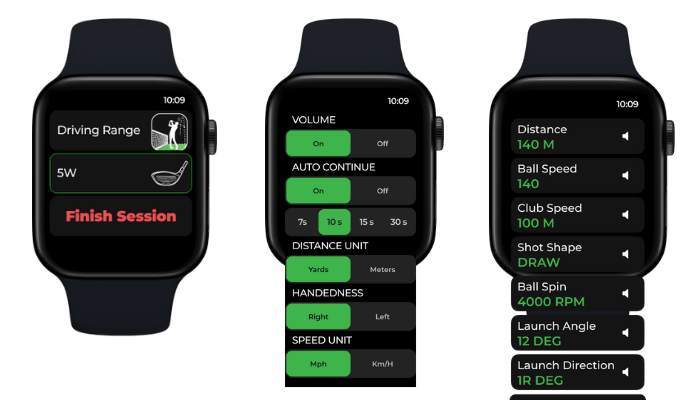
Apple Watch App Functionality
We've got exciting plans to expand the functionality of the ChipIn Shot Tracker Apple Watch app; here is what is currently possible.
- Automatic Download: When you download the ChipIn Shot Tracker iPhone app from the App Store, the Apple Watch app is automatically downloaded and updated.
- Simple Activation: The Apple Watch app is automatically triggered when the iPhone app is set up to play
- View Results: You will receive a new haptic notification when new results are available, scroll and view all club parameters to view your overall performance
- Change Clubs: Choose your club directly from the watch
- End a current session
- Update Settings: Easily update common settings such as:
- Unit Measurements (mph/kmh and yds/mts)
- Switch your swing hand (right/left) for multi-players
- Switch Volume on/off
- Change Auto-Continue time duration
- Receive important in-session notifications and confirm or clear them without having to touch your phone.
Common Questions and Answers
Q: How do I start using the ChipIn Shot Tracker Apple Watch app?
A: The Apple Watch app starts automatically when you set up the iPhone app to play. Ensure your Apple Watch is paired with your iPhone and the ChipIn Shot Tracker app is installed on both devices.
To troubleshoot pairing or installation issues, view this article: Apple Watch not installed or iPhone not pairing
Q: What permissions do I need to grant for the Apple Watch app to work correctly?
A: To ensure a consistent connection between the watch and your phone we request access to your Health data. This allows us to save your ChipIn Shot Tracker sessions as workouts, but is also highly recommended to maintain a stable connection. While granting access to Health data is not compulsory, it may impact the signals being sent between both devices.
Q: What is haptic feedback, and how is it used in the ChipIn Apple Watch app?
A: Haptic feedback provides a tactile response to alert you of certain actions. In the ChipIn Shot Tracker app, you will receive haptic feedback when:
- A ball is detected, and the app is ready for a shot.
- Shot results are ready.
- There is an error or notification that requires attention on your iPhone.